Chrome Extension · Free to Install

From AI chat to
knowledge, not just files.
Captured, refined, yours.

From AI chat to knowledge. You copy. GoldMindy does the rest.

GoldMindy captures insights from ChatGPT, Claude, Gemini, and more — refines them with AI, and archives them to Notion or Obsidian. One extension. Every platform.

Works with: ChatGPT Claude Gemini Perplexity DeepSeek Any webpage
chatgpt.com
GoldMindy capturing and archiving AI responses
Sound familiar?

You're using AI every day.
But none of it sticks.

01

Your brain wasn't built for this.

Human working memory holds roughly 7 items at a time. AI can generate 700 insights in the same session. The best idea you've ever prompted? Gone by dinner. Not because you're bad at note-taking — because nobody is fast enough.

02

Every AI has a Notion integration. None of them talk to each other.

Claude MCP pushes here. ChatGPT Actions go there. Gemini somewhere else. Three inboxes, zero structure — and you're still the one organizing everything. GoldMindy sits upstream: captures across all platforms, refines and tags each insight, then archives into one database. What arrives in Notion is already knowledge.

03

Three AIs. One fried brain.

ChatGPT for writing. Claude for analysis. Gemini for research. Switching between three platforms doesn't multiply your output — it fragments your thinking. The tab switching, the "where did that insight go," the context collapse. Flow never gets a chance to form. GoldMindy captures every insight silently, so you never have to break focus to save one. Stay in flow. Lose nothing.

Three steps. One extension.

Capture → Refine → Archive

① Capture

Hit copy.
It's already saved.

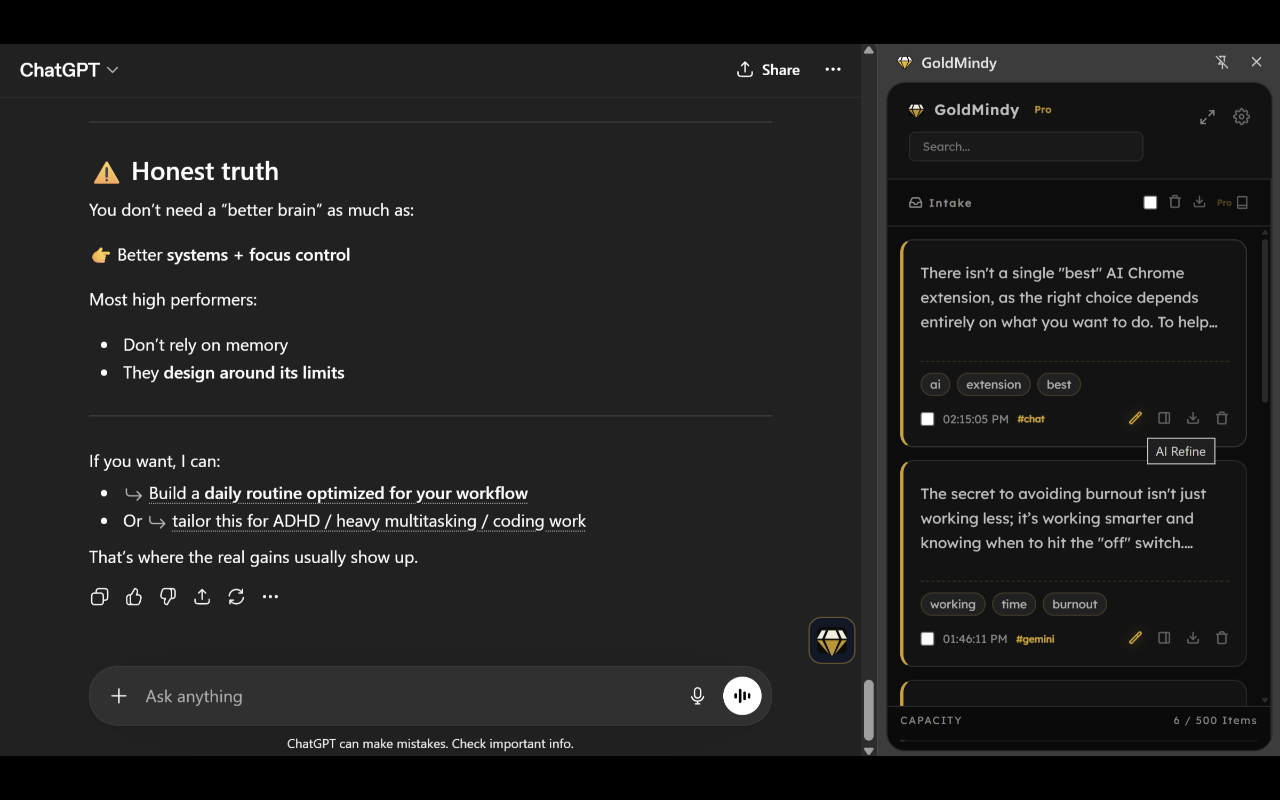
Press the copy button on any AI response — GoldMindy catches it silently. The diamond glows to confirm. No popups, no context switching, no extra cost. Or right-click any text on any webpage.

chatgpt.com
GoldMindy capturing a ChatGPT response
Copy response
Saved
② Refine

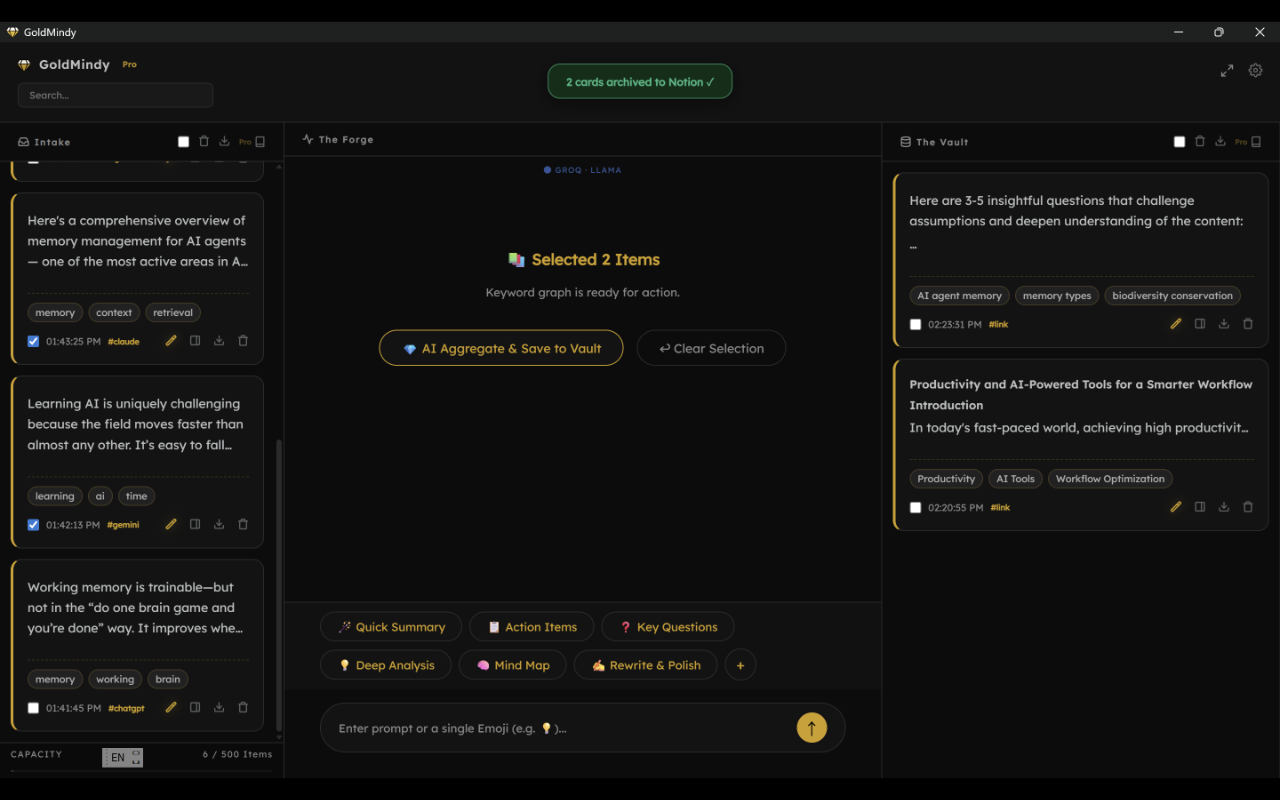
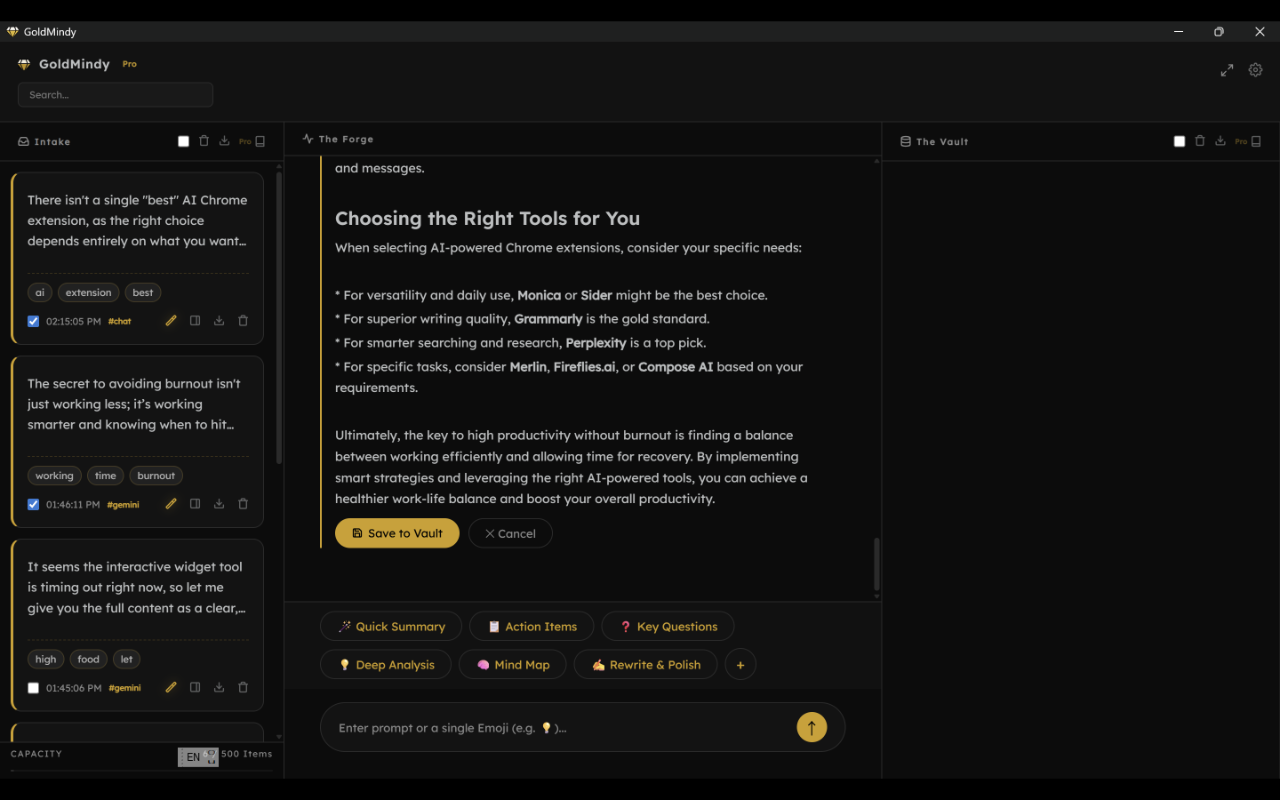
The Forge: AI turns raw captures into structured knowledge.

Select cards and run a prompt. GoldMindy extracts tags, generates summaries, and surfaces connections across your library. Bring your own free Groq key — no extra subscription needed.

GoldMindy · The Forge
The Forge AI refinement interface
③ Archive

Send it where it belongs. Automatically.

Push refined cards to Notion with one click — GoldMindy auto-creates your database columns (Capture At, Source URL, Platform, Tags) on first archive. No templates to configure, no columns to add. Or export clean Markdown for Obsidian. Your format, your rules.

notion.so · GoldMindy Inbox
Cards archived to Notion database
✓ 2 cards archived to Notion
The bigger picture

Imagine a knowledge base
that builds itself.

Every AI conversation you have becomes a card.

Every card gets tagged, summarized, and connected to what you already know.

Every insight lands in Notion — organized, searchable, yours.

Not someday. Starting with your next copy.

Powered by your own free Groq key  ·  ChatGPT, Claude, Gemini, Perplexity, DeepSeek, and any webpage

Everything you need.
Nothing you don't.

Notion Smart Archive

Batch archive cards to Notion with one click. GoldMindy auto-creates your database columns — Capture At, Source URL, Platform, Tags — on first use. No setup, no manual columns.

Obsidian Smart Archive

Each card exports as its own .md file — with YAML frontmatter, tags, and summary callout. Select multiple cards and download a ZIP of individual notes, ready to drop into your vault.

Markdown batch export

Export all your cards as a single Markdown file in one click. Clean formatting, ready to import anywhere.

Floating panel

The diamond button lives on every AI platform. Hit copy on any response — it glows to confirm the card is saved.

Webpage capture

Right-click any selected text on any webpage to save it as a card — not just AI platforms. Your whole web becomes capturable.

Full-text search

Search across all your cards instantly. Find any insight from any conversation, any source, any time.

AI refinement (BYOK)

Bring your own free Groq key. Tags, summaries, connections — automated at zero extra cost.

100% private

All data stored locally in your browser. No servers, no accounts, no tracking. Your notes never leave your device.

Multi-language

Traditional Chinese, English, Japanese — switch anytime from settings. The UI adapts instantly.

Simple pricing

Start free. Upgrade when you're ready.

Free
$0
 
  • Up to 100 cards
  • Floating panel button
  • Right-click capture
  • Custom prompt hooks
  • Markdown export
  • Notion Smart Archive
  • Obsidian Smart Archive
  • AI refinement (BYOK)
Coming Soon
Pro Monthly
$8.90 / month
 
  • Up to 500 cards
  • Floating panel button
  • Right-click capture
  • Custom prompt hooks
  • Markdown export
  • Notion Smart Archive
  • Obsidian Smart Archive
  • AI refinement (BYOK)
Get Pro Monthly
Pro Annual
$59 / year
Save $46.80 — 5 months free
  • Up to 500 cards
  • Floating panel button
  • Right-click capture
  • Custom prompt hooks
  • Markdown export
  • Notion Smart Archive
  • Obsidian Smart Archive
  • AI refinement (BYOK)
Get Pro Annual
Private by design

Your knowledge.
Your device.
Your rules.

Every insight you've ever prompted reflects your thinking — your questions, your curiosity, your intellectual property. Unlike tools that harvest your data to train their models, GoldMindy keeps everything exactly where it belongs: on your device, under your control, forever.

Captured locally
Every card lives in Chrome's built-in storage — on your device. Not our servers, not the cloud, not anywhere else.
Keys stay with you
Your API keys and Notion tokens are stored locally. We never see them — not during setup, not ever.
Zero telemetry
No analytics. No usage tracking. No accounts required. GoldMindy doesn't know you exist — and that's the point.
Read our full Privacy Policy →

Frequently asked questions

Do I need an API key to use GoldMindy?
No. Capture and card management work without any API key. AI refinement (tags + summaries) requires a free Groq API key — free to get at console.groq.com.
Where is my data stored?
Everything is stored locally on your device using Chrome's built-in storage. Nothing is sent to GoldMindy's servers.
How do I set up Notion archiving?
Create a Notion Internal Integration at notion.so/my-integrations, copy the secret, then connect it to your database. Paste the secret and your Database ID into GoldMindy's settings. On first archive, GoldMindy automatically creates the Capture At, Source URL, Platform, and Tags columns — no manual setup needed.
What AI platforms does GoldMindy work on?
ChatGPT, Claude, Gemini, Perplexity, DeepSeek, Grok — and any webpage via right-click.
Can I cancel my subscription?
Yes, cancel anytime from your LemonSqueezy customer portal. Monthly plans stop at the end of the billing period.
What's the difference between Lifetime and Annual?
Lifetime is a one-time payment — pay once and use GoldMindy Pro forever, including all future updates. Annual is billed each year.
How is GoldMindy different from AI Exporter or other export tools?
Export tools save the whole conversation as a file. GoldMindy captures the specific insight that matters, refines it with AI, connects it to your other cards, and sends it to your Notion database — automatically. It's not an exporter. It's a personal knowledge manager built around AI.
Claude and ChatGPT already have native Notion integrations. Why do I need GoldMindy?
Native integrations (MCP, Actions, plugins) let each AI push directly to Notion — but each one creates its own silo. Claude's insights land in one page, ChatGPT's in another, Gemini's somewhere else. You still need to organize all of it yourself.

GoldMindy sits upstream. It captures from every platform first, refines and tags the content, then archives everything into one structured database. What arrives in Notion is already organized knowledge — not three separate raw dumps waiting for you to clean up.

Start capturing your best
AI insights today.

Free to install. No account required. Works in 30 seconds.

Chrome Web Store — Coming Soon